


What is an Information Security Policy and How It Shapes Safe IT Practices
Today, every business relies on information systems to operate efficiently. Yet the risks are real. 60% of small businesses shut down within six months after a major cyber attack hits their operations. Without a clear Information Security Policy, sensitive data, client information, and core business systems remain vulnerable to threats that can disrupt operations and erode trust.
As Nahjee Maybin, CEO of Kenyatta Computer Services, puts it: “A clearly defined security policy is beyond compliance, it is a pillar of business continuity in the digital age.”
A strong policy sets rules, defines responsibilities, and ensures employees understand their role in safeguarding information. By establishing clear guidelines, businesses can reduce exposure to cyber risks, maintain resilience, and protect against financial losses.
This blog will explain:
- What an Information Security Policy is and why it matters
- How it shapes safe IT practices across your organization
Steps to implement a robust policy that supports long‑term business continuity
Protect Data Like a Pro Without Breaking the Bank!
Take control of your business IT with a tailored Information Security Policy.
Key Elements of an Effective Information Security Policy
An effective Information Security Policy establishes how your business manages and protects information. To achieve this, it must address people, processes, and technology in a structured way.
1. Roles and Responsibilities
Clear role definition ensures accountability across the organization. Every staff member should understand their responsibilities for safeguarding sensitive data.
- Data owners: Senior personnel responsible for specific datasets, overseeing access, storage, and compliance.
- System administrators: Manage technical security measures and collaborate with data owners to enforce protections.
Assigning roles reduces confusion, speeds up incident response, and prevents unauthorized access.
2. Risk Assessment and Mitigation
Regular risk assessments help identify vulnerabilities in hardware, software, and human practices. Documenting threats and creating mitigation strategies ensures proactive defense.
- Patch outdated software
- Monitor user activity
- Implement firewalls and intrusion detection systems
The goal is to reduce exposure before a threat escalates into an incident.
3. Asset Management and Classification
Knowing what you have is fundamental. Maintain an inventory of information, IT systems, cloud services, and devices.
Classify data into categories such as:
- Public
- Internal
- Confidential
This prioritization ensures sensitive data receives the highest protection and aligns with business continuity planning.
4. Access Control Guidelines
Access should be role‑based, granting employees only what they need to perform their jobs. Strong controls include:
- Password policies
- Multi‑factor authentication
- Regular access audits
These measures reduce insider threats and support regulatory compliance.
5. Incident Response and Disaster Recovery
Your policy must define how to handle security incidents. Step‑by‑step procedures should cover reporting, mitigation, and recovery.
- Assign a Computer Security Incident Response Team (CSIRT)
- Establish communication protocols during incidents
- Test disaster recovery plans regularly
This ensures business continuity even in the face of breaches.
6. Monitoring and Continuous Improvement
Security is never static. Continuous monitoring, log reviews, and audits keep defenses strong. Policies should evolve with:
- Emerging threats
- Regulatory changes
- Technological advancements
This adaptability ensures your Information Security Policy remains effective over time.
| Learn More About Cybersecurity |
How to Create an Information Security Policy Template for Small Business
An Information Security Policy template for small business simplifies the process of policy creation. Instead of starting from scratch, templates provide a structured foundation, reduce errors, and save valuable time. They ensure that critical areas of security are not overlooked, which is essential for protecting sensitive data and maintaining business continuity.
1. Value of Using a Template
Templates act as a checklist for security essentials. They cover roles, risk management, incident response, and more, ensuring your business doesn’t miss key elements that could expose you to threats.
By using a template, you align your practices with industry standards while tailoring them to your specific needs.
2. Steps to Customize Your Template
To make the template truly effective, you’ll need to adapt it to your organization:
- Review the template and identify sections relevant to your business.
- Update roles to match your organizational structure.
- Add details about IT operations, vendor management, and cloud services.
- Adjust access control and data classification according to your needs.
- Include a process for regular updates and audits.
This customization ensures the policy reflects your business environment rather than remaining generic.
3. Tips for Integration
A policy is only effective if it’s integrated into daily operations. To achieve this:
- Provide training programs so staff understand their responsibilities.
- Tie the policy into IT operations, vendor management, and legal compliance.
- Ensure consistency across departments by making the policy accessible and enforceable.
Small businesses can create a tailored document that balances practicality with industry‑standard practices by using a sample information security policy as a starting point. This approach strengthens resilience against cyber threats while keeping operations efficient and compliant.
Practical Information Security Policy Examples
Examining information security policy examples helps small businesses see how abstract principles translate into real‑world applications. By looking at practical scenarios, organizations can adapt policies to their own environment and strengthen resilience against cyber threats.
Case Scenarios
- Network Security: Limit access to servers and enforce firewalls to block unauthorized traffic.
- Data Handling: Encrypt confidential information both at rest and in transit to protect sensitive records.
- Remote Work: 73% executives see remote staff as a higher security risk for their organization. Define rules for accessing company systems from home or mobile devices, including VPN use and device security standards.
These examples show how policies directly shape safe IT practices. Aligning each section of your policy with operational needs, employee roles, and regulatory requirements ensures that security measures are actionable rather than theoretical.
Common Challenges in Implementing an Information Security Policy
Even the strongest Information Security Policy can fail without proper implementation. Small businesses often face hurdles that must be addressed proactively.
- Employee resistance and adoption issues: Staff may resist new policies due to perceived inconvenience. Overcome this by training employees, demonstrating benefits, and fostering a security‑focused culture.
- Limited IT resources: Smaller organizations may lack dedicated personnel or advanced tools. Prioritize critical assets and leverage cost‑effective solutions such as cloud security services or automated monitoring.
- Compliance and regulatory hurdles: Laws like GDPR require strict data protection. Keep your policy aligned with regulations to avoid penalties, and designate someone to monitor compliance and track legislative changes.
- Maintaining and updating policies: Threats evolve rapidly. Regular reviews and updates ensure your policy addresses new risks. A static policy leaves your business vulnerable to cyberattacks.
Best Practices for Maintaining Your Information Security Policy
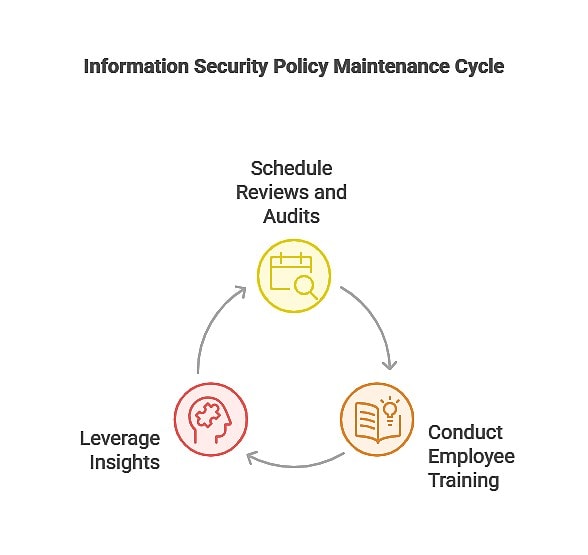
Maintaining your policy is just as important as creating it. Ongoing attention ensures that it remains effective and relevant.
- Schedule reviews and audits: Conduct quarterly or annual audits to verify compliance.
- Align with ITIL standards: Incorporate service‑level agreements and best IT practices.
- Employee training: 80% of organizations confirm that security awareness training reduces employee exposure to phishing attempts. Use sample policy procedures to educate staff and reinforce accountability.
- Leverage insights: Apply lessons learned from your “What is Information Security Policy” framework to strengthen security measures, monitor compliance, and mitigate risks.
By adhering to these best practices, your business stays protected, reduces the likelihood of operational disruptions, and builds a culture of security that supports long‑term growth.
Benefits of a Strong Information Security Policy for Your Business
A well‑crafted Information Security Policy provides clear advantages that go beyond compliance. It establishes a framework for protecting sensitive data, strengthens trust with clients, and ensures operational resilience. By embedding security into everyday practices, businesses reduce risks and create a culture of accountability.
Key benefits include:
- Minimizes risks: Reduces exposure to cyber threats and internal misuse.
- Enhances client trust: Demonstrates commitment to protecting customer data.
- Reduces financial exposure: Avoids penalties, data loss, and costly downtime.
- Simplifies IT management: Provides a centralized template for consistent security measures across departments.
Understanding a policy’s elements can feel overwhelming. The table below summarizes critical actions that businesses should include in their Information Security Policy. It serves as a quick reference guide, ensuring no key areas are overlooked.
| Policy Element | Action Steps | Benefits |
| Roles and Responsibilities | Assign Data Owners, System Admins, and CSIRT members | Ensures accountability and faster incident response |
| Risk Assessment | Conduct quarterly risk reviews, document threats | Identifies vulnerabilities early and mitigates risks |
| Asset Management | Maintain an updated inventory of all IT assets and data | Enables proper classification and protection |
| Access Control | Implement MFA, role‑based access, and periodic reviews | Reduces insider threats and unauthorized access |
| Incident Response | Establish step‑by‑step reporting and mitigation procedures | Minimizes damage and speeds recovery |
| Employee Training | Conduct mandatory cyber awareness and policy training | Promotes compliance and reduces human error |
| Policy Review and Updates | Review policies annually or after significant IT changes | Keeps the policy current and aligned with regulations |
Protect Your Business Data With Kenyatta Computer Services
A clear information security policy is the foundation of protecting your business, staff, and clients. By now, you understand what an information security policy is, how to create a template, and how practical examples guide successful implementation.
Regular reviews, employee training, and structured incident management strengthen your IT systems and reduce risks.
| Enhance Your Security Infrastructure With Expert Help in Denver, CO! | ||
| Cybersecurity | IT Network Support | IT Consultants |
KCS stands as a trusted provider of cybersecurity solutions for 1,863+ end users across 38 companies nationwide. For over 35 years, we have helped businesses optimize and secure their IT infrastructure while ensuring full regulatory compliance.
Schedule a Consultation!
Safeguard your information assets with a robust, actionable policy that supports long‑term resilience and growth.